What to do when a crypto exchange goes down while you have an open position
If an exchange stops responding while you hold a position, your first job is to find out what is actually broken, the second is to stop making it worse, and the third is to reduce your risk by whatever route still works. Do not keep resending the same order, because earlier attempts may have gone through. Check the mobile app and the API as alternative routes, consider hedging elsewhere if your exposure is large, and record what happened in case you need to raise it later.
Try another route into the same exchange, confirm your true position before acting, and hedge on another venue only if the risk justifies it. Most of the useful preparation happens before an outage: orders already resting at the exchange, a funded second account and low enough leverage to survive an hour you cannot act in.
This is general information, not trading advice. Your exchange's terms decide how outages and losses are treated, and hedging adds costs and risks of its own.
First, find out what is broken
"The exchange is down" can mean several different things, and your options depend on which it is. Spend the first minute working that out.
- Your connection: try mobile data, or another device. Many apparent outages end here.
- The app or website only: the trading engine may be fine. The API or the other client may still work.
- The market data feed: prices on your screen may be frozen, while orders still execute. Do not trust what you see until it updates.
- The trading system: orders are rejected or stuck. This is the serious case.
- Everything: rare, but it happens. Then you are limited to acting elsewhere.
Our guide on how to check if an exchange is down walks through this in detail, and each exchange page shows our most recent reading of its public API, with the time it was taken.
Do not spam orders
The natural reaction is to keep pressing the close button. That can leave you worse off.
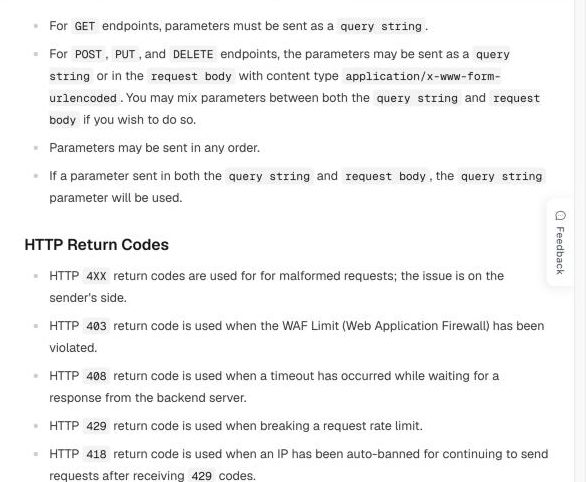
When a system is struggling, an error on your screen does not always mean your order failed. Binance's API documentation is explicit about one case: a 503 with the message "Unknown error, please check your request or try again later" means the request was sent but no response came back in time, and it warns you not to treat this as a failure, because the execution status is unknown and it could have succeeded. If you then send the order again, you may close twice as much as you intended and find yourself with an opposite position.
So before you resend: refresh your open positions and open orders, by any route available. If you cannot see them, assume the earlier attempt may have worked. Use a reduce-only flag when closing if your exchange offers one, because a reduce-only order can only make the position smaller and so cannot flip you into a new position. In the Binance case above, its documentation notes that close-position, reduce-only and cancel orders are exempt from one kind of system-level throttling, which is one more reason to use them for closing.
Try every route into the same exchange
An exchange often has several ways in, and they do not always fail together. Try each of them, in the order that is fastest for you.
- The mobile app if you were on the website, or vice versa.
- A different domain: some exchanges run regional API domains or alternative hostnames. Use only addresses from the exchange's own documentation, because fake domains target people in exactly this situation.
- The API, if you have keys set up already. This is not the moment to create them for the first time.
- A connected platform, if your account is linked to a trading terminal or bot.
Stop as soon as one works. Then close or reduce only what you have decided to, and confirm the result on a second screen if you can.
Hedge elsewhere if your exposure is too large
If you cannot reach the exchange and your position is large relative to your account, you can reduce your net exposure by taking the opposite position on another exchange. A long you cannot close on exchange A can be offset by a short of similar size on exchange B. Your net exposure to price falls, whichever way the market moves.
This is only possible if you prepared: you need an account that is already verified and funded on a second exchange. Consider the following before you do it.
- Your original position could still be liquidated. A hedge protects your overall wealth, but the margin on the first exchange is still at risk when the price moves against that leg, and the gains on the hedge are elsewhere.
- It adds cost. You pay fees and slippage to open it and again to close it, and possibly funding too. See the funding arbitrage guide for how such two-leg positions behave.
- You now have two positions to unwind. Once the exchange recovers, there is often a violent price move. Plan the order of closing before it comes back.
- The second exchange may be struggling too. Outages cluster in busy markets. It may also be slower than usual.
For small positions, the honest answer is often that a hedge costs more than the risk it removes. Work out how much you would lose in a plausible move before you add to your complexity.
What happens to your stop-loss and take-profit orders
Orders resting on the exchange may still execute during a partial outage, since they live on the exchange's side rather than on your screen. This is a strong reason to set them in advance. But do not count on them completely: a stop triggered during disorder can fill far from its trigger, and a trigger itself relies on systems that may be under strain. Assume that a stop is good protection in most conditions and is not a guarantee in all of them.
When the exchange returns, check all your open orders. An order you had given up on could still be live and could trigger as the market moves. Many exchanges cancel certain orders during maintenance; others do not. Check which applies to yours.
Funding, liquidation and the return of trading
Being unable to reach the exchange does not mean its clock stops. Funding settlements may still occur, and mark prices may still update. Exchanges have different rules on what happens during a complete failure, and some pause liquidations or settlements during major incidents. Find out your exchange's position only from its announcements.
The minutes after a recovery are often the most dangerous. Prices may have moved while the book was empty, so the first prints can be wild, and a queue of orders hits the market at once. If your position is safe, there is often no need to trade in the first seconds, when the spread is wide and the book is thin. Our guide on order book depth explains why.
Keep a record
If the outage has cost you money, your evidence will matter, and it is easiest to gather at the time.
- Take screenshots showing the time, the error, and your position, if you can see it.
- Note the exact time in UTC of each attempt and each error.
- Save any order IDs and any messages from support.
- Check the exchange's announcements for an incident notice, and save a copy.
- Export your order history and funding history when the service returns.
Independent records can support your account of events, but only for what they measure. Our incident log records failures of public APIs from one location at given times. That can show that something was wrong at that moment, but not that your specific order was affected. Contact support only through official channels, and never share your password, 2FA codes or recovery phrases with anyone who contacts you first.
Prepare before the next one
An outage is much easier to handle if you decided what to do beforehand.
- Use leverage you could survive an hour without touching. This is the single most effective preparation. Work out how far the price could move in one hour, and whether your position would survive that move.
- Keep stops and take-profits resting on the exchange, not only in your head or in an external tool.
- Hold a funded, verified account on a second exchange, with API access set up if you use it.
- Know your routes: install the app, bookmark the official domain, and keep your 2FA device with you.
- Check reliability before you choose where to hold a big position. Compare exchanges on our ranking and on their incident records, especially during busy periods.
Common questions
Will the exchange compensate me for losses during an outage?
That depends entirely on the exchange and its terms, and you should not assume it. Some exchanges have compensated users after major incidents, and many terms limit their liability for outages. Keep your records, contact official support, and read the relevant announcement.
Can I withdraw my funds while the exchange is down?
Usually not if the affected systems handle withdrawals, and exchanges may also pause withdrawals as a precaution. Check the exchange's wallet status page for your asset. Be suspicious of anyone offering a way around it, because such offers are often scams.
Should I switch exchanges after an outage?
One outage is rarely enough to decide. Look at the pattern over months: how frequent, how long, and at what kinds of moments. Our monthly reports are intended to make that comparison simple.
During an outage, in order
- Identify what is broken and rule out your own connection.
- Check your real position and open orders before resending anything.
- Try other official routes into the exchange.
- Close with reduce-only where possible.
- Hedge elsewhere only if the risk justifies the cost.
- Record times, errors and screenshots.
- When service returns, review all open orders first.
Related reading: How to check if an exchange is down · How to read uptime and outage records · Mark price vs last price
Sources
Binance · API general information · OKX · Status · How we measure · About Tickmark
Other guides
What is a funding rate in crypto perpetual futures? A plain explanation
A funding rate is a regular payment between traders holding opposite sides of a perpetual futures contract. It exists because a perpetual contract never expires, so something else has to keep its price close to the underlying asset. When the rate is positive, longs pay shorts; when it is negative, shorts pay longs. The exchange sets the formula but, on the major exchanges, the money moves between traders.
How to compare funding rates across crypto exchanges: 8h vs 4h settlement
You cannot compare two funding rates by looking at the percentages alone. A rate only means something once you know how often it is charged, whether you are long or short, and whether the two readings describe the same contract at the same moment. The same +0.01% costs twice as much per day on a four-hour schedule as on an eight-hour one, and it earns a short exactly what it costs a long.
What does a negative funding rate mean? Who pays, and what it does not tell you
A negative funding rate means traders holding short positions pay traders holding long positions at the next settlement. It usually happens when a perpetual contract trades below its index price, which often reflects heavy shorting or hedging. It does not mean the price is about to fall or about to rise, and it is not free income for longs, because the price can move against them by far more than the payment.
How to convert a funding rate to APR, and why the number can mislead you
To annualise a funding rate, multiply the rate per settlement by the number of settlements in a day, then by 365. A rate of 0.01% every eight hours becomes 0.01% × 3 × 365 = 10.95% a year. This puts contracts on different schedules onto one scale, which makes them comparable. It does not tell you what you will earn or pay over a year, because it assumes today's rate never changes.
Funding rate arbitrage explained: how it works and what eats the profit
Funding rate arbitrage means holding two offsetting positions in the same asset so that price moves roughly cancel, and collecting funding payments on one side. The classic version buys spot and shorts the perpetual. A second version shorts the perpetual on the exchange with the higher rate and goes long on the exchange with the lower rate. It is often described as risk free. It is not. The risks are simply different from the risk of an ordinary directional trade.
Mark price vs last price vs index price: which one liquidates you?
Perpetual futures show three prices that are easy to mix up. The last price is where the most recent trade happened. The index price is an average of spot prices across several exchanges. The mark price is an exchange's estimate of what the contract is fairly worth, and on the major exchanges it is what decides your unrealised profit and whether you are liquidated. Knowing which price does what explains why a position can be liquidated even though the chart never touched your liquidation level.
How much does a market order really cost? Fees, spread and slippage
The fee on an exchange's fee page is only part of what a market order costs. The rest comes from the price you actually receive, which depends on the direction of your trade, your order size and the depth of the order book at that moment. To compare exchanges fairly, measure the average fill price against one reference price, then add your trading fee on top, and be careful not to count the spread twice.
How to estimate slippage from order book depth before you trade
Slippage is the difference between the price you expected and the average price you actually got. You can estimate most of it before placing an order, because the order book shows how much is available at each price. Add up the levels on the side you will consume until they cover your size, calculate the average price, and compare it with the mid price. The estimate is only as good as the snapshot it came from, and books thin out at the moments you are most likely to need them.
Maker and taker fees explained: how to compare crypto exchange trading fees
A maker adds an order to the book that waits to be filled. A taker fills against an order already there. Most exchanges charge takers more than makers, because makers supply the liquidity others trade against. Comparing exchanges by the headline fee alone is misleading: you need to know which side you usually trade on, what tier your volume actually puts you in, and how the fee compares with slippage and funding on the same trade.
How to check if a crypto exchange is down: a step-by-step guide
When an exchange stops working for you, the first question is whether it is down for everyone or only for you. You can usually answer that in a couple of minutes: check the exchange's own status page, check an independent measurement, try a different network, and test the public API directly. Each source sees something different, so one green page does not prove everything is fine, and one failed request does not prove the exchange is down.
Is an exchange really down? How to read API uptime and outage records
Uptime describes the share of successful requests to particular services, over a particular period, from a particular network route. It does not establish whether you can place an order, withdraw funds or trust an exchange with your assets. A figure like 99.9% is useful only if you know what was tested, from where and for how long, so this guide explains how to read those details on our pages and on anyone else's.
Why exchange APIs reject timestamps: clock offset and stale quotes explained
A fast response can contain an old quote. Round-trip latency, clock offset and quote age describe different parts of a request, and mixing them up can make a clock mismatch look like a delayed market feed. This guide explains each one with a worked example, shows how we estimate them, and covers what to do when an exchange API rejects your request because of the time.
Binance error -1021 timestamp: causes and how to fix it
Binance API error -1021 INVALID_TIMESTAMP means the timestamp on your signed request falls outside the window Binance will accept. The message usually reads "Timestamp for this request is outside of the recvWindow" or "was 1000ms ahead of the server's time". In most cases your own clock is the cause, so the fix is to synchronise it, measure the offset against Binance's server time, and handle any remaining network delay properly. A larger recvWindow can hide the problem, but it should not be your first move.
Crypto exchange API rate limits: what error 429 means and how to stay under it
HTTP 429 means you have sent too many requests in a given time, and the server is asking you to slow down. It is not an outage. Each exchange counts requests differently: Binance uses a weight for each endpoint and bans IP addresses that keep going after a 429, Bybit blocks an IP that passes 600 requests in five seconds, and OKX sets limits per endpoint and returns error code 50011. Staying under the limit means reading the response headers, backing off properly and using WebSockets where you can.
Why an exchange API returns 403 or 451: blocks and regions
A 403 means the server understood your request and refuses to carry it out. A 451 means access is refused for legal reasons. On crypto exchange APIs, a 403 can be a web firewall, a request limit, an unauthorised key or a regional block, so the code alone does not tell you which. The response body, the exchange's documentation and a comparison from another network usually do. A real restriction applies to you for a reason, so the right response is to find out whether the service is available where you are.
Before you open a crypto exchange account: a checklist by country
Before you open an account on a crypto exchange, check four things: whether the exchange is allowed to serve people where you live, whether your country's regulator lists it, whether the site in front of you is the real one, and how the exchange has been running lately. The sign-up form takes ten minutes. Recovering from the wrong choice can take months, and sometimes it is not possible at all. This guide works through each check, using Binance and OKX as worked examples because they are the two exchanges readers ask us about most.
How to open and verify a Binance account: a step-by-step guide
Opening a Binance account takes four steps: register with an email address, a phone number or a Google, Apple or Telegram account; complete identity verification; secure the account; and make a first deposit. Registration takes a few minutes. Binance says verification is usually reviewed within 48 hours. This guide follows each step as Binance's own help pages describe it on 8 November 2026, with screenshots of those pages, and points out the details that most often cause trouble later.
How to open and verify an OKX account: a step-by-step guide
Opening an OKX account takes four steps: register with your country of residence, an email address and a phone number; complete identity verification; secure the account; and make a first deposit. OKX says it reviews verification applications within 24 hours. Which OKX company you end up with depends on where you live, and that decides the address you log in at, the fees you pay and the products you see. This guide follows OKX's own help pages as they stood on 8 November 2026, with screenshots, and flags the choices that are hard to undo. OKX shows some help pages differently by region; we read the versions served at okx.com/en-us, and the rules shown in your own account after you log in are the ones that apply to you.