How to open and verify a Binance account: a step-by-step guide
Opening a Binance account takes four steps: register with an email address, a phone number or a Google, Apple or Telegram account; complete identity verification; secure the account; and make a first deposit. Registration takes a few minutes. Binance says verification is usually reviewed within 48 hours. This guide follows each step as Binance's own help pages describe it on 8 November 2026, with screenshots of those pages, and points out the details that most often cause trouble later.
First confirm that Binance can serve you: it does not accept residents of the United States, Canada or the Netherlands, it stopped taking on new users in the EU from July 2026 and in the UK from 2023, and several countries have their own local Binance company. If it can, register, add a referral code at the last step if you have one, complete verification with an ID that has not expired, then turn on a passkey or an authenticator app, an anti-phishing code and the withdrawal whitelist before you deposit.
Before you start: can Binance serve you?
Binance's List of Prohibited Countries, updated on 5 January 2026, names three groups. Anyone located in, resident in or a citizen of the United States. Anyone located or resident in Canada or the Netherlands. And anyone in Cuba, North Korea, Iran, Crimea and the occupied Donetsk and Luhansk regions. Binance's terms of use, effective from 27 October 2026, also forbid using a VPN to get around these restrictions.
Some places are not on the list but are still closed to new users. Having not obtained MiCA authorisation by the 1 July 2026 deadline, Binance stopped onboarding new users in the European Union from that date and limited existing EU accounts to managing positions and withdrawing. It stopped accepting new UK users in October 2023.
In other countries Binance works through a local company, and that is the one you should use: for example Tokocrypto in Indonesia, Binance TR in Türkiye, Binance Japan and Binance Australia. Binance.US is a separate company for the United States. A local company has its own sign-up, terms and fees, and this guide does not cover them. If you are not sure whether you are allowed to open an account where you live, read our checklist by country first.
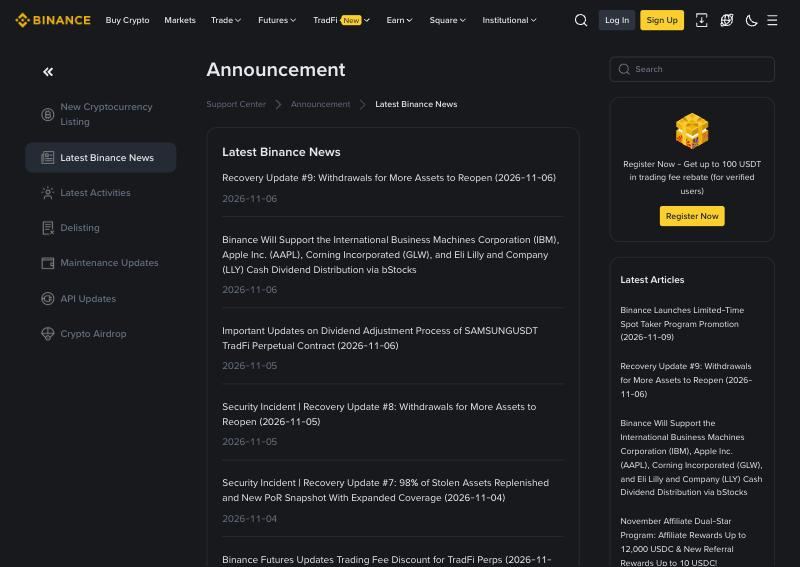
What is happening at Binance right now
In late October 2026 Binance announced a security incident in which funds were stolen, and suspended withdrawals. It began reopening withdrawals in phases on 1 November. Its recovery update of 4 November said Binance had replenished about 98% of the stolen assets from its own resources and would cover the losses, not its users. Its update of 6 November said withdrawals were reopening asset by asset and network by network, and that deposit services remained open.
For a new account, the practical consequence is simple. Before you deposit a coin, open Binance's withdrawal page or network status page for that coin and that network and confirm that withdrawals work. If they do not yet, wait until the latest recovery update lists that coin and network. Our Binance status page shows how Binance's public API has been answering; it does not cover withdrawals.
Step 1: register
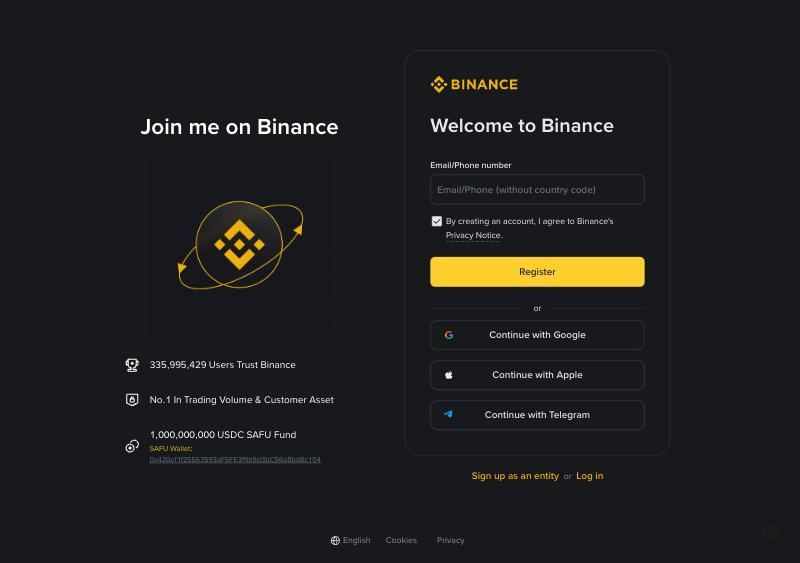
Go to the Binance site by typing the address yourself or through a link you trust, and choose Sign Up. A personal account can be registered with an email address, a phone number, or a Google, Apple or Telegram account. A company needs an entity account, which starts from the "Sign up as an entity" link and cannot be changed into a personal one later.
- Enter your email address or phone number and accept the terms of service and privacy notice.
- Enter the six-digit code Binance sends you. Binance says the code must be used within 30 minutes.
- Set a password of at least eight characters, with at least one uppercase letter and one number. Binance's help page lists shorter steps for Google and Apple sign-ups, without the code and password.
- The last screen asks for a referral ID. It is optional. If you arrived through a referral link it is already filled in; if the code shown is wrong, you can edit it before you confirm.
The referral step is the only chance to add one. Binance's help pages say a referral cannot be modified once it is linked, and its referral FAQ says nothing can be corrected after the new user has registered.
This is a referral link. It has no effect on any figure on this page — see Method.
Step 2: complete identity verification
Every new user has to complete verification before using Binance's products, including crypto deposits and trading. Existing users who have not verified are limited to withdrawing, cancelling orders and closing positions.
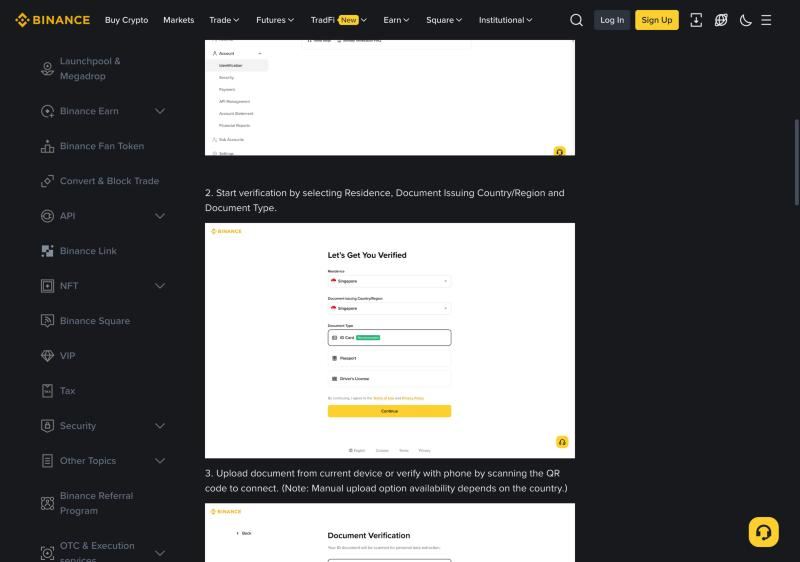
- Open Account, then Identification, and choose Get Verified.
- Choose your country of residence, the country that issued your document, and the document type: an ID card, a passport or a driving licence, depending on what that country offers.
- Upload the front and back of the document from your device, or scan the QR code to continue on your phone. Binance notes that manual upload is not offered in every country.
- Complete the liveness check: allow camera access, remove hats, glasses and filters, and make sure the light is good.
- Confirm your personal details. They must match your document, and they cannot be changed after you confirm them.
Binance asks users not to refresh the browser during verification. It says applications are usually reviewed within 48 hours, and that some take longer. The current help page does not publish limits for each level; it says to check the Identification page, which shows your own limits after you log in.
Proof of address
Binance may also ask you to verify your residential address. Its help page lists what it accepts: utility, internet or landline bills, bank or credit card statements, and letters from a government body, among others. The document must show your name, your address, the date of issue and who issued it. Payslips and medical bills are not accepted, mobile phone bills only in some countries, and post office boxes and virtual offices not at all.
The document must be no older than six months in most countries, three months in some, including Argentina, Australia, Brazil, Italy and Spain, and two months in India. It can be a PDF, JPG or PNG. A national ID card or residence permit that shows your address can serve as proof of address, but not if it is the same document you used to verify your identity. Binance says address checks can take up to one to two working days.
If verification is rejected
Binance does not publish a single list of rejection reasons, but its verification and address pages describe what a valid submission looks like. Most rejections come from one of these:
- Personal details that do not match the document exactly, including the order of names and the date format.
- A document that has expired, or a document type not offered for your issuing country.
- A photo that is blurred, cropped, black and white, edited, or has glare across the text.
- A proof of address that is too old, shows a different name, or is missing the full address and postcode.
- A refreshed or closed browser in the middle of the process.
Fix the cause before you try again. Sending the same photo a second time rarely changes the result.
Step 3: secure the account before you deposit
Binance's security tips say to always enable two-factor authentication and to use a passkey or an authenticator app as an alternative to SMS. Set up these four things before you put any money in:
- A passkey or an authenticator app. Passkeys are under Security, then Passkeys (Biometrics), and work with iCloud Keychain, Google Password Manager or a hardware security key. Changing your authenticator later disables withdrawals and P2P trading for 24 hours.
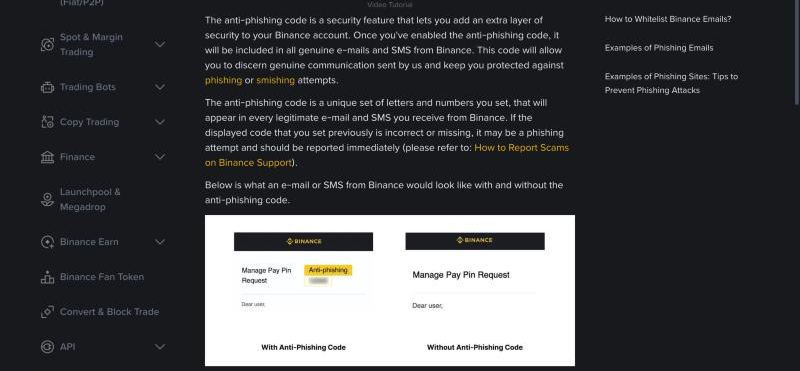
- An anti-phishing code. Set it under Account, Security, Advanced Security. It must be six to eight characters, using at least three of uppercase letters, lowercase letters, digits and underscores. Every genuine Binance email and SMS will show it.
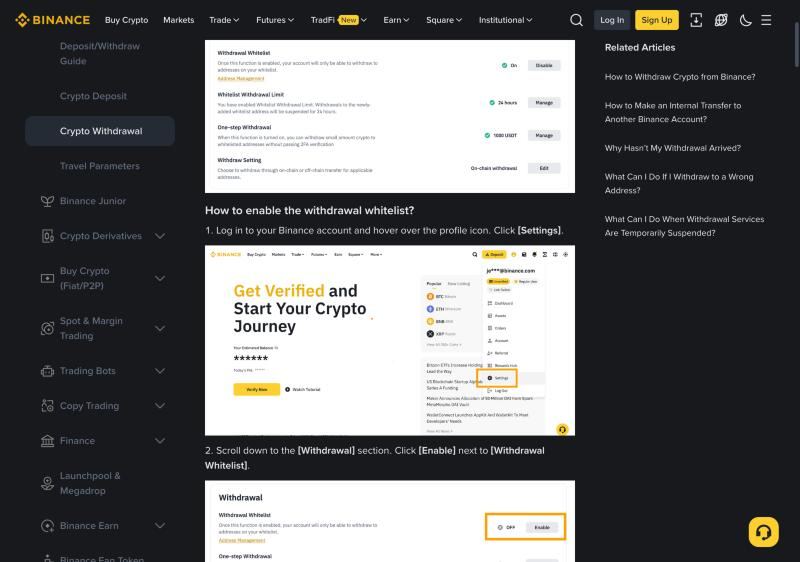
- The withdrawal whitelist. Turn it on under Settings, Withdrawal. Withdrawals then go only to addresses you have saved, up to 200 of them. Changes to these settings can suspend withdrawals for 24 to 72 hours, which is the point: an attacker cannot change them and withdraw at once.
- Binance Verify. Before you trust a website, an email address, a phone number or a social media account claiming to be Binance, check it on Binance Verify. Binance says it never asks for funds or tokens in private messages.
Step 4: make a first deposit
To deposit crypto, open Deposit, choose Deposit Crypto, pick the coin and then the network, and copy the address or scan the QR code. The network must be one the sending wallet supports; Binance warns that funds sent on the wrong network might be lost and not recoverable. Coins such as XRP, XLM and EOS also need a memo or tag. Send a small amount first and wait for it to arrive.
To buy with a card, Binance accepts Visa and Mastercard credit and debit cards as well as Apple Pay and Google Pay, with up to five linked cards. Your bank may treat the purchase as a cash advance and charge its own fee.
P2P requires completed verification and at least one two-factor method. You pay the seller directly, then mark the order as paid. Binance allows at most two open orders, and three cancellations in a day suspend buying for that day. If the crypto is not released after you have paid, open an appeal inside the order instead of contacting the seller elsewhere.
Binance trading fees for a new account
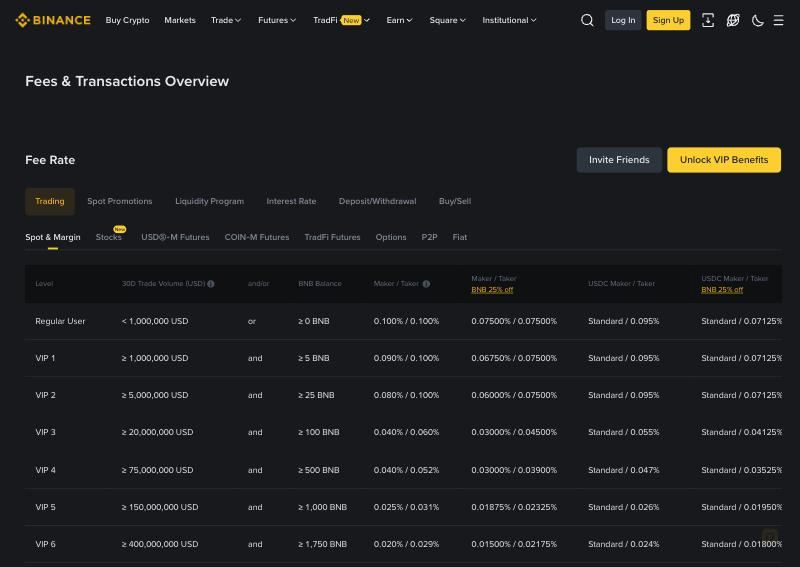
On spot trades, a regular account pays 0.100% as maker and 0.100% as taker. Paying fees in BNB lowers both to 0.075%. VIP 1 starts at a 30-day trading volume of at least $1,000,000 together with a BNB balance of at least 5 BNB. Withdrawal fees are separate and depend on the coin and network. Our guide to what a market order really costs shows why the fee is only part of the cost of a trade.
Common questions about opening a Binance account
How long does Binance verification take?
Binance says identity verification is usually reviewed within 48 hours, and that some cases take longer. Address verification can take one to two working days.
Can I add a referral code after I have registered?
No. The referral ID is entered at the last registration step, and Binance says it cannot be modified once linked.
Can I use Binance without verification?
No. New users must complete verification before depositing or trading. Accounts that were opened earlier and never verified can only withdraw, cancel orders and close positions.
Can I open a second account?
A personal account can create up to five sub-accounts, which is the supported way to separate funds. A second personal account under the same identity is not.
Checklist
- Confirm that Binance, and not a local Binance company, is the one that serves your country.
- Register through an address you typed or a link you trust.
- Enter a referral code at the last step if you have one.
- Verify with an unexpired document and details that match it exactly.
- Set up a passkey or an authenticator app, an anti-phishing code and the withdrawal whitelist.
- Check the latest recovery update and the network status for the coin you will deposit.
- Send a small test deposit first.
Related reading: Before you open a crypto exchange account · How to open and verify an OKX account · Binance API status and uptime
Sources
Binance · How to register · Binance · Identity verification · Binance · Proof of address · Binance · List of Prohibited Countries · Binance · Licences · Binance · Security tips · Binance · Anti-phishing code · Binance · Withdrawal whitelist · Binance Verify · Binance · Fee schedule · Binance · Recovery Update #7 · Binance · Recovery Update #9 · Binance · Passkeys · Binance · Terms of Use · Cointelegraph · Binance EU limits · How we measure
Other guides
What is a funding rate in crypto perpetual futures? A plain explanation
A funding rate is a regular payment between traders holding opposite sides of a perpetual futures contract. It exists because a perpetual contract never expires, so something else has to keep its price close to the underlying asset. When the rate is positive, longs pay shorts; when it is negative, shorts pay longs. The exchange sets the formula but, on the major exchanges, the money moves between traders.
How to compare funding rates across crypto exchanges: 8h vs 4h settlement
You cannot compare two funding rates by looking at the percentages alone. A rate only means something once you know how often it is charged, whether you are long or short, and whether the two readings describe the same contract at the same moment. The same +0.01% costs twice as much per day on a four-hour schedule as on an eight-hour one, and it earns a short exactly what it costs a long.
What does a negative funding rate mean? Who pays, and what it does not tell you
A negative funding rate means traders holding short positions pay traders holding long positions at the next settlement. It usually happens when a perpetual contract trades below its index price, which often reflects heavy shorting or hedging. It does not mean the price is about to fall or about to rise, and it is not free income for longs, because the price can move against them by far more than the payment.
How to convert a funding rate to APR, and why the number can mislead you
To annualise a funding rate, multiply the rate per settlement by the number of settlements in a day, then by 365. A rate of 0.01% every eight hours becomes 0.01% × 3 × 365 = 10.95% a year. This puts contracts on different schedules onto one scale, which makes them comparable. It does not tell you what you will earn or pay over a year, because it assumes today's rate never changes.
Funding rate arbitrage explained: how it works and what eats the profit
Funding rate arbitrage means holding two offsetting positions in the same asset so that price moves roughly cancel, and collecting funding payments on one side. The classic version buys spot and shorts the perpetual. A second version shorts the perpetual on the exchange with the higher rate and goes long on the exchange with the lower rate. It is often described as risk free. It is not. The risks are simply different from the risk of an ordinary directional trade.
Mark price vs last price vs index price: which one liquidates you?
Perpetual futures show three prices that are easy to mix up. The last price is where the most recent trade happened. The index price is an average of spot prices across several exchanges. The mark price is an exchange's estimate of what the contract is fairly worth, and on the major exchanges it is what decides your unrealised profit and whether you are liquidated. Knowing which price does what explains why a position can be liquidated even though the chart never touched your liquidation level.
How much does a market order really cost? Fees, spread and slippage
The fee on an exchange's fee page is only part of what a market order costs. The rest comes from the price you actually receive, which depends on the direction of your trade, your order size and the depth of the order book at that moment. To compare exchanges fairly, measure the average fill price against one reference price, then add your trading fee on top, and be careful not to count the spread twice.
How to estimate slippage from order book depth before you trade
Slippage is the difference between the price you expected and the average price you actually got. You can estimate most of it before placing an order, because the order book shows how much is available at each price. Add up the levels on the side you will consume until they cover your size, calculate the average price, and compare it with the mid price. The estimate is only as good as the snapshot it came from, and books thin out at the moments you are most likely to need them.
Maker and taker fees explained: how to compare crypto exchange trading fees
A maker adds an order to the book that waits to be filled. A taker fills against an order already there. Most exchanges charge takers more than makers, because makers supply the liquidity others trade against. Comparing exchanges by the headline fee alone is misleading: you need to know which side you usually trade on, what tier your volume actually puts you in, and how the fee compares with slippage and funding on the same trade.
How to check if a crypto exchange is down: a step-by-step guide
When an exchange stops working for you, the first question is whether it is down for everyone or only for you. You can usually answer that in a couple of minutes: check the exchange's own status page, check an independent measurement, try a different network, and test the public API directly. Each source sees something different, so one green page does not prove everything is fine, and one failed request does not prove the exchange is down.
Is an exchange really down? How to read API uptime and outage records
Uptime describes the share of successful requests to particular services, over a particular period, from a particular network route. It does not establish whether you can place an order, withdraw funds or trust an exchange with your assets. A figure like 99.9% is useful only if you know what was tested, from where and for how long, so this guide explains how to read those details on our pages and on anyone else's.
What to do when a crypto exchange goes down while you have an open position
If an exchange stops responding while you hold a position, your first job is to find out what is actually broken, the second is to stop making it worse, and the third is to reduce your risk by whatever route still works. Do not keep resending the same order, because earlier attempts may have gone through. Check the mobile app and the API as alternative routes, consider hedging elsewhere if your exposure is large, and record what happened in case you need to raise it later.
Why exchange APIs reject timestamps: clock offset and stale quotes explained
A fast response can contain an old quote. Round-trip latency, clock offset and quote age describe different parts of a request, and mixing them up can make a clock mismatch look like a delayed market feed. This guide explains each one with a worked example, shows how we estimate them, and covers what to do when an exchange API rejects your request because of the time.
Binance error -1021 timestamp: causes and how to fix it
Binance API error -1021 INVALID_TIMESTAMP means the timestamp on your signed request falls outside the window Binance will accept. The message usually reads "Timestamp for this request is outside of the recvWindow" or "was 1000ms ahead of the server's time". In most cases your own clock is the cause, so the fix is to synchronise it, measure the offset against Binance's server time, and handle any remaining network delay properly. A larger recvWindow can hide the problem, but it should not be your first move.
Crypto exchange API rate limits: what error 429 means and how to stay under it
HTTP 429 means you have sent too many requests in a given time, and the server is asking you to slow down. It is not an outage. Each exchange counts requests differently: Binance uses a weight for each endpoint and bans IP addresses that keep going after a 429, Bybit blocks an IP that passes 600 requests in five seconds, and OKX sets limits per endpoint and returns error code 50011. Staying under the limit means reading the response headers, backing off properly and using WebSockets where you can.
Why an exchange API returns 403 or 451: blocks and regions
A 403 means the server understood your request and refuses to carry it out. A 451 means access is refused for legal reasons. On crypto exchange APIs, a 403 can be a web firewall, a request limit, an unauthorised key or a regional block, so the code alone does not tell you which. The response body, the exchange's documentation and a comparison from another network usually do. A real restriction applies to you for a reason, so the right response is to find out whether the service is available where you are.
Before you open a crypto exchange account: a checklist by country
Before you open an account on a crypto exchange, check four things: whether the exchange is allowed to serve people where you live, whether your country's regulator lists it, whether the site in front of you is the real one, and how the exchange has been running lately. The sign-up form takes ten minutes. Recovering from the wrong choice can take months, and sometimes it is not possible at all. This guide works through each check, using Binance and OKX as worked examples because they are the two exchanges readers ask us about most.
How to open and verify an OKX account: a step-by-step guide
Opening an OKX account takes four steps: register with your country of residence, an email address and a phone number; complete identity verification; secure the account; and make a first deposit. OKX says it reviews verification applications within 24 hours. Which OKX company you end up with depends on where you live, and that decides the address you log in at, the fees you pay and the products you see. This guide follows OKX's own help pages as they stood on 8 November 2026, with screenshots, and flags the choices that are hard to undo. OKX shows some help pages differently by region; we read the versions served at okx.com/en-us, and the rules shown in your own account after you log in are the ones that apply to you.